 Mark's Backyard
AI translation notice: This English version was translated from the original Chinese article with AI assistance. Some nuances may differ from the original.
A while back, I happened to notice that a hand-tracking library I had starred on GitHub a long time ago had shipped an update. I have long since forgotten why I starred it — probably because I had just heard about hand tracking, thought it sounded cool, and hit the star button. I had never actually looked at it, or even read any of its code.
But this chance glance got me thinking: so many years have passed, AI has come this far, hand tracking must be pretty impressive by now too. So I went to read up on it, found Google's MediaPipe, and quickly thought back to the motion games I played on the Xbox 360 as a kid. If I could build a game with this, it would be pretty neat.
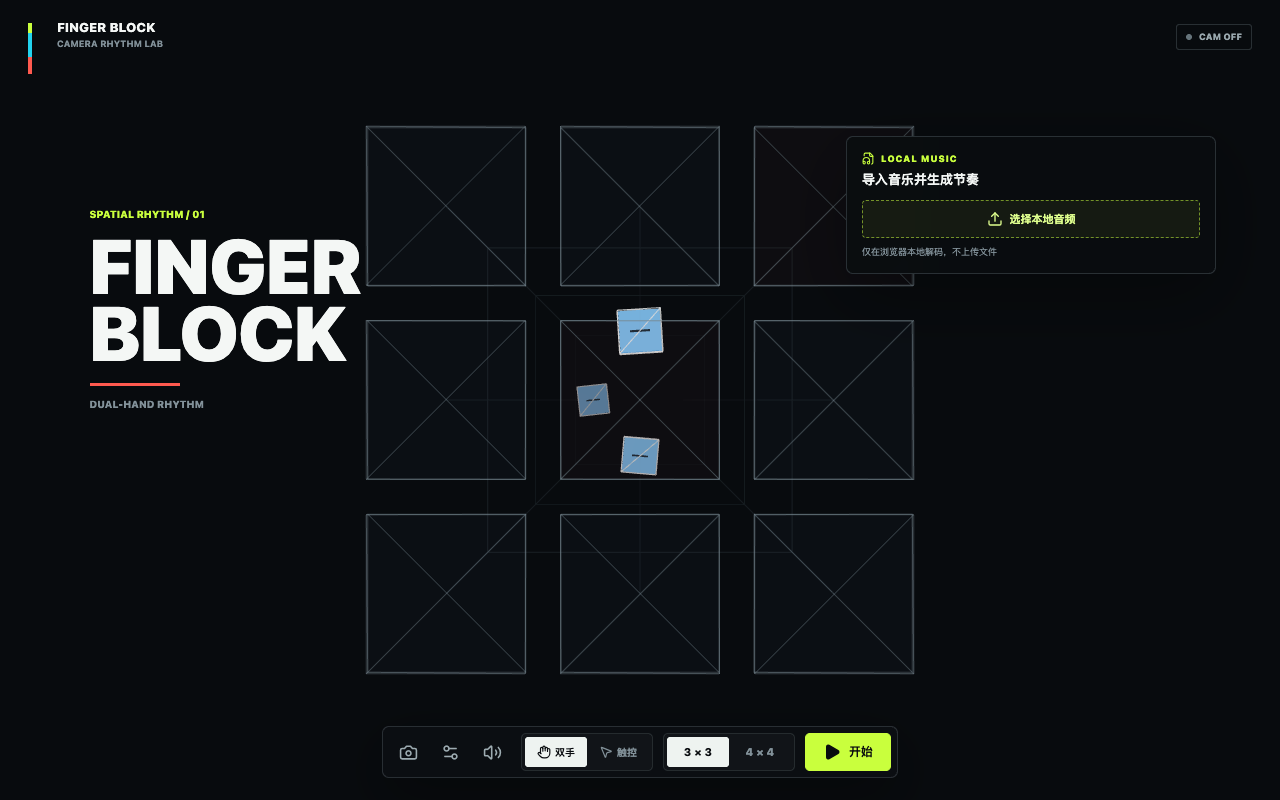
It was just a passing thought, but it kept coming back to me before I fell asleep. Then a concept for a rhythm game in the vein of Beat Saber slipped down the chimney of my mind like Santa Claus and left this gift behind: you face your laptop's camera, blocks in the game slide along tracks toward a judgment grid, and you hit them with your fingers. The controls are simple and easy to grasp, and it seemed reasonably easy to build, too.
So I turned to AI, describing the requirements in my spare moments between practice problems, and five or six conversations later the first version existed. (The AI overlord's power really does get more terrifying by the day.)
 finger-block.vercel.appFingerBlockClick to open it and give it a try
The project code is already on GitHub: MarkXuJQ/finger-block. This article records how I settled on the game's basic design, which technologies I picked, and a bit of the optimization work.
The Basic Technical Structure of the Project
- FingerBlock is a browser-side Vite + React project, since I am fairly familiar with that workflow.
- Rendering uses React Three Fiber and Three.js, which I used to imitate a bit of Beat Saber's sense of space.
- Interface icons come from Lucide, simple and efficient.
Next, on to the core of the game:
Hand Tracking: MediaPipe
Hand tracking uses the Hand Landmarker from Google's MediaPipe Tasks Vision. It provides hand keypoint detection, and I used it to turn the detection results into the input FingerBlock needs.
The flow in
useHandTracking.tsgoes roughly like this:
- After the camera starts, the MediaPipe WASM files and the hand model are loaded on demand.
- It tries the GPU delegate first and falls back to the CPU delegate on failure.
- It tracks at most two hands and reads the index fingertip keypoint of each hand, which is the eighth landmark.
- The camera feed shown to the player is mirrored, so the code swaps the left and right hand labels to keep physical left/right consistent with on-screen left/right.
videoLandmarkToViewportconverts video coordinates into viewport coordinates, andgetLaneFromPointmaps them onto the 3×3 or 4×4 judgment grid.- The coordinates get simple smoothing to reduce the jitter from frame-by-frame camera detection.
At that point I figured that since I already had a way to take input from hand gestures through the camera, I might as well add touch control too, so the game could be played on phones as well. So I had AI fill in that feature too. It is worth mentioning, though, that on phones and tablets there is often noticeable lag because performance is not quite sufficient, so this part could probably be improved gradually later. Here is the general idea:
The camera is not the only input method. The project later added a
pointermode, where the mouse and touch can both operate directly inside the judgment area. Touch usespointerIdand pointer capture to track multiple fingers, and even when no newpointermovefires, a continuous presence loop keeps a Hold alive. That way, even after the browser has been granted camera permission, the player can still switch to touch and finish a round.
Audio Analysis: Moving Audio Processing into a Worker
From a Fixed Chart to Automatic Generation
After finishing the hand-tracking feature, I had AI build a small sample with one fixed chart first, to test whether my idea was workable. The result was quite good: it caught my index finger position nicely, and the detection was reasonably accurate.
Once the fixed chart worked end to end, the content production problem showed up.
I do not own the rights to any music, and I do not have the ability or the time to hand-craft charts for a large number of songs. Doing it like other rhythm games, where someone has to manually mark timestamps, positions, and block types, would make scaling the game very expensive. But playing with just a fixed chart and no music at all would be pretty boring.

Then I thought of the Steam game Dead as Disco. I have never actually played it, but I had seen gameplay videos of it. It made me realize that I could try doing what that game does: build a set of music analysis, then generate charts automatically from the analysis results, and let players upload whatever music they like. Would that not be lovely?
The Implementation
Music import supports whatever the browser can decode: MP3, WAV, M4A/MP4, and OGG, with a limit of 80 MB per file and 12 minutes of duration. That should be enough for the vast majority of music — and anyway, playing a rhythm game alone for 12 minutes is tiring enough. The file is then decoded in the current browser through the Web Audio API's decodeAudioData().
The processing in
analysis-core.tsis more complete than simply reading the BPM:
- First mix multiple channels down to mono and resample everything to 22,050 Hz;
- Compute overall RMS energy with a frame of roughly 50 milliseconds;
- Estimate low-frequency energy from the result of a 180 Hz low-pass;
- Generate a normalized energy curve and a waveform preview over time windows;
- Find transients from the energy difference between the current frame and the preceding few frames — the moments that likely correspond to drum hits or clear attacks;
- Analyze BPM and beat candidates with the Beatroot algorithm from
music-tempo;- Split the song into three energy sections: quiet, normal, and peak;
- Compute a confidence score from the beat match rate and transient coverage.
The music-tempo I used is a lightweight MIT-licensed BPM/beat analysis library. It is well suited to producing quick candidate results inside a browser Worker, but it cannot possibly get everything right for music with a weak beat, free tempo, or long stretches of silence, so the interface keeps the ability to manually adjust the BPM, the first beat, and the playback speed (0.5×, 1×, or 2×). In most cases, of course, it still locks onto most of the rhythm.
Automatic Chart Generation: Rule Constraints
chart-generator.ts uses a pseudo-random number generator with a fixed seed. The seed is derived from the song identifier, grid size, difficulty, BPM, and first beat together, so the same piece of music under the same set of settings will reliably produce the same chart, and only after you change the parameters do you get a new result. Maybe that buys a certain stability.
The generator reads beats, energy, and transients from the audio analysis results, then uses the easy, normal, and hard configurations to decide the sampling step, density, chord probability, Hold probability, and maximum travel distance.
Block colors are tied to musical features as well: downbeats or strong transients produce red accent blocks, ordinary blocks are blue, and some low-intensity off-beat events are marked as yellow optional bonus blocks. This keeps the game playable while also reinforcing the music's rhythm visually.
But the genuinely tricky part is that “random content still has to be playable with two hands.” A person has at most two index fingers, and wildly random blocks are certainly not something a human can clear, so I added several kinds of constraints to the project.
At Most Two Fingers Occupied at Once
First, the two index fingers are treated as the maximum number of inputs available at once, and the generator uses MAX_SIMULTANEOUS_NOTES = 2 to constrain the number of blocks within overlapping judgment windows. Even if two blocks do not share the exact same timestamp, as long as they fall in the same hit window they are treated as competing for the same two fingers.
Double hits are allowed on high-energy downbeats, but the generator also checks whether there are already enough blocks nearby, to avoid accidentally creating a third target that needs handling at the same time.
No Holds in the Center Cells
Tracks that approach from a distance in 3D make the central area an important visual reference. If a long-lasting block sits in the middle, it can cover the depth outline and also get in the way of the player watching the blocks that follow. So lane-rules.ts first defines a single center cell for the 3×3 grid and four center cells for the 4×4 grid, and beatmap.ts rejects any Hold located in those cells during validation.
This rule exists in both the generation stage and the final chart validation stage: the generator uses excludeCenter to avoid the center, while the validator prevents future hand-written or external charts from bypassing the generator and writing illegal Holds. That way the rule is not just a convention people “hope to follow” but a constraint enforced at the data layer.
A Hold Restricts the Other Hand
A Hold is not a long block that is judged only once at its start. After hitting the start, the player has to keep the same hand inside the corresponding cell; the project scores the sustain every 0.25 seconds and allows a brief tracking grace period of about 0.18 seconds. If the hand is released partway through, the points already earned are kept, and no extra Miss is recorded.
Because one hand is occupied by the Hold, the other hand has less room to move. The generator therefore:
- Only generates Holds in non-quiet sections where the duration is long enough and the energy is not low;
- Reduces the free hand's generation density to a fraction of the normal state during a Hold;
- Places the free hand's notes on whole beats where possible and reserves longer beat gaps;
- Limits the free hand's travel distance and prefers the opposite side of the grid from where the Hold is;
- Leaves a recovery gap after the Hold ends, then gradually restores travel distance and density.
On normal difficulty a Hold lasts about two beats; easy is longer, and hard is shorter but denser. Double Holds appear only with low probability in sufficiently long melodic sections, and they are placed on opposite sides of the grid so each hand has a clear target. laneBlockedUntil also prevents new notes from being generated in the same cell before the Hold ends.
The Chart Still Has to Be Validated
Everything generated goes through validateBeatmap(): it checks the version, grid size, difficulty, song information, note ordering, note IDs, whether color and role match, whether Hold durations are valid, and whether notes in the same cell overlap. The generator is responsible for creating content, and the validator is responsible for making sure the content honors the data contract, which makes problems easier to spot when the rules are changed later.
Game Sound Effects: Building a Drum Kit from a Few Samples
In the age of AI, implementing the logic has become easy, but assets are still a hard problem. Fortunately there is a huge amount of CC0 open-source material available online. Since most music can sit on top of a kick drum (and music that cannot take a drum is not really suited to a rhythm game anyway 😄), it was natural to use drum kit sounds for the hit effects. Every sound source used is recorded in public/assets/ATTRIBUTIONS.md along with its origin, license, date obtained, processing applied, and SHA-256 checksum.
The current hit sounds come from five recordings on Freesound marked CC0: KEVOY's side stick and rimshot, TheEndOfACycle's closed hat and sub kick, and quatricise's shaker. The project used FFmpeg to trim them, fade them out, limit peaks, convert the sample rate, and encode them as Vorbis OGG;
miss.oggis a low-passed, low-gain low thud.At runtime the six OGG files are not treated as six unrelated cues but layered like a drum kit:
- A normal Hit plays the side stick;
- Good adds a light rim on top of it;
- Perfect layers in the closed hat as well;
- Accent stacks an extra low kick;
- Bonus adds the shaker;
- Miss uses the separate low thud.
This design gives the different judgments a shared tonal anchor while still distinguishing feedback through the number of layers and the timbre. The music channel and the effects channel also each go through a GainNode on the AudioContext, so hit sounds do not drown out the music the user imported.
Final Tweaks and a Bit of Simple Design
Once the core logic worked, the remaining work was mostly repeated playtesting and fine-tuning: block movement speed, the sense of depth on the tracks, the position of the judgment grid, the smoothness of the camera cursor, the flash and shards on a hit, the score and combo on the HUD, the density at each difficulty, and the relative volume of music and effects.
Clock, Judgment, and Feedback
At runtime the game does not use a plain setInterval as its only clock. Music playback uses Web Audio's AudioContext and AudioBufferSourceNode, MusicClock records the start time and pause position within the audio context, and the game logic then computes block positions and judgments from that music timeline.
The judgment window for ordinary blocks is ±0.26 seconds: within ±0.07 seconds is Perfect, within ±0.15 seconds is Good, and anything else still inside the overall window is Hit. The base scores are 1000, 650, and 350 respectively, and red Accent blocks get a 1.2× base score bonus. Yellow Bonus blocks are not quite the same as ordinary notes you can miss; they play the role of an optional reward.
Hold sustain scoring is also written as a deterministic function: every 0.25 seconds it only consumes complete scoring intervals and clamps time at the end of the Hold. Even if the browser stalls for a few hundred milliseconds on some frame, you will not get a different sustain score just because of a different number of animation frames.
Hit feedback is generated in one place by judgement-events.ts, and the Three.js scene plays the flashes, expanding rings, wireframes, and shard effects that strengthen the sense of impact; the results page also plots a cumulative accuracy curve and the timing of Misses. The project also freezes the music clock and the Hold compensation logic when the page is hidden, so that after switching to the background and coming back, blocks do not all skip past the judgment area because the page was paused.
Of course, this part is pretty rough, because I feel the idea has largely been realized, and unless something special comes up I probably will not keep optimizing it.
Final Thoughts
A Playable Demo in a Day and a Half
From seeing the hand-tracking library update to finishing a runnable FingerBlock demo, the whole process took about a day and a half. And I was not sitting in front of the computer writing code the entire time: I spent a good chunk of it doing practice problems and watching lectures, and used my lunch break to hunt for open-source libraries and assets, study audio analysis methods, and keep playtesting and adjusting the generation rules.
To be fair, AI really did speed up getting this idea off the ground by a large margin. From scaffolding the project and tuning the audio-track parsing to stuffing in all those constraint rules, a lot of the tedious boilerplate now just requires me to think the requirements through clearly and hand them to AI, and it produces the whole thing in one go. All I have to do is check and verify.
AI Is Powerful, but This Quick Experiment Was Not All AI
I will not credit AI with the whole of this quick FingerBlock demo.
As I wrote in an earlier post, When Open Source Is Only a Prompt: I Found a Ridiculous New Way to Open Source, a few good prompts, a clear tech stack, and well-chosen links to assets are the real key to getting the most out of AI and improving efficiency.
AI can take on more and more of the concrete execution work, but that does not mean we should hand over our basic thinking and planning as well. Only by keeping those foundational skills can we judge faster whether an idea is feasible, find suitable open-source resources more accurately, and understand what the AI-generated code actually solved and what problems it left behind. Maybe that is the technical constant that has stayed unchanged from Web coding to today's vibe coding.
September 23
Uh oh. I get the feeling that if I did this again now, AI could do more, and do it better. This is a message I saw in a group chat, and these games really are playable.
Everything below was generated with a single-sentence prompt to Claude Opus 5.5
QQ Speed: https://lf3-static.bytednsdoc.com/obj/eden-cn/nulojnulwlo/qqfeiche3d/index.html
CrossFire: Transport Ship: https://lf3-static.bytednsdoc.com/obj/eden-cn/nulojnulwlo/cf-transport-ship/transport-ship.html
A Pelican Riding a Bicycle: https://lf3-static.bytednsdoc.com/obj/eden-cn/nulojnulwlo/pelican-bike/index.html
September 25
Today while scrolling videos online I came across this website. It feels like it shares something with my own approach, which was a nice surprise. That said, it requires a little bit of music theory knowledge, and of course the play style is more free-form. And it is genuinely pretty cool.
Video:
Website:

- Author:Mark Xu
- Copyright:All articles in this blog are licensed under CC BY-NC-SA 4.0 unless stating otherwise.